

App roundup

The best menu translator apps in 2026

For reading a restaurant menu specifically, MenuVista is the app built for the job: it reads the menu as a menu, explains what each dish actually is, and flags allergens. For everything else on a trip — signs, tickets, conversations — Google Translate is still the one to keep on your phone, and it is free. Most travellers are best served by both. This page is about where each one stops being useful.

Last updated August 23, 2026

The short answer

There is no single winner here, because “translate this menu” and “translate this text” are different jobs. Google Translate converts words, free and offline. MenuVista converts a menu into dishes you can choose between, with ingredients, allergen flags and photos. Papago reads Korean, Japanese and Chinese script better than the generalists. Pick by what you are standing in front of.

  1. 1

    Best for restaurant menus: MenuVista

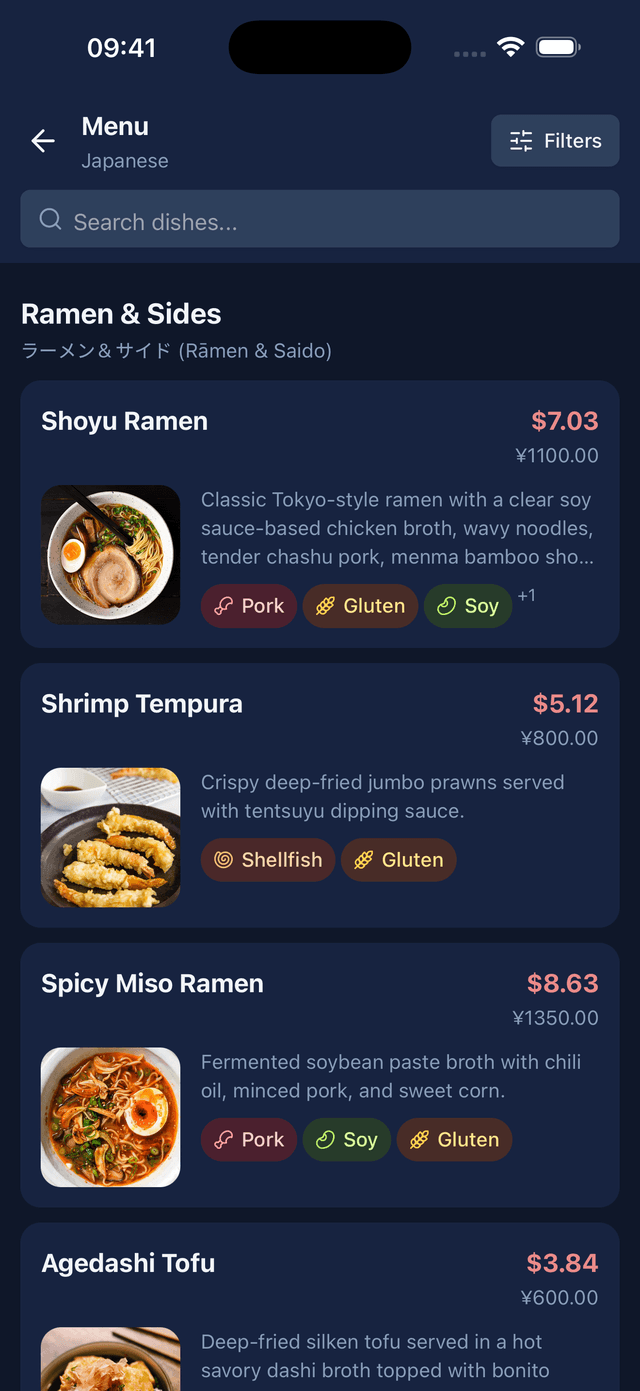
    The only app here that treats a menu as a structured document instead of a block of text. You get sections, both names for every dish, a plain description of what it is, the ingredient list, allergen and dietary flags, and a photo — the things you need in order to choose, not just to read.

  2. 2

    Best free all-rounder: Google Translate

    Free, offline once you download a language pack, and it covers the other 90% of a trip: signs, tickets, pharmacy labels, conversations. The camera mode is fast and the language list is unmatched. It simply will not tell you what is in the dish.

  3. 3

    Best for Korean, Japanese and Chinese: Papago

    Naver built Papago for Korean first and it shows, with Japanese and Chinese close behind. If your trip is to Seoul, Tokyo or Taipei, it earns its place for signs and script alone.

How they compare

AppPlatformsReads the menu as a menuExplains the dishAllergen flagsDish photosWorks offlineLive camera overlay
MenuVista
Free to download, one menu scan a day; a subscription lifts the limit.
iOS, AndroidYesYesYesYesNoNo
Google Translate
Free.
iOS, AndroidNoNoNoNoYesYes
Papago
Free.
iOS, AndroidNoNoNoNoPartlyYes
Google Lens
Free.
iOS, AndroidNoNoNoPartlyNoYes
Apple Translate
Free, built into iPhone.
iOSNoNoNoNoYesYes
Waygo
Free for a limited number of translations per day, with a paid unlock.
iOS, AndroidNoPartlyNoNoYesYes

Capabilities and pricing models last verified August 23, 2026. Subscription prices vary by country — check the store listing before you buy.

#1

MenuVista

Free to download, one menu scan a day; a subscription lifts the limit.
Best at

Turning a photographed menu into a list of dishes you can compare. It keeps the menu's own structure — starters, mains, drinks — and for each dish returns the original name, a translation, a plain description of what the dish actually is, its ingredients, allergen and dietary flags, an estimated nutrition breakdown and a photo. It will also show the dish name back in the original language, so you can point your phone at the waiter instead of attempting the pronunciation.

Where it falls short

It needs a connection: menus are processed in the cloud, so there is no offline mode. It is not a live camera overlay either — you photograph the menu once and read the result. And it does menus and nothing else; for a train timetable, use something else.

Pick it if

You care what you are eating — allergies, dietary rules, an unfamiliar cuisine, or simply not wanting to order the third-cheapest thing again.
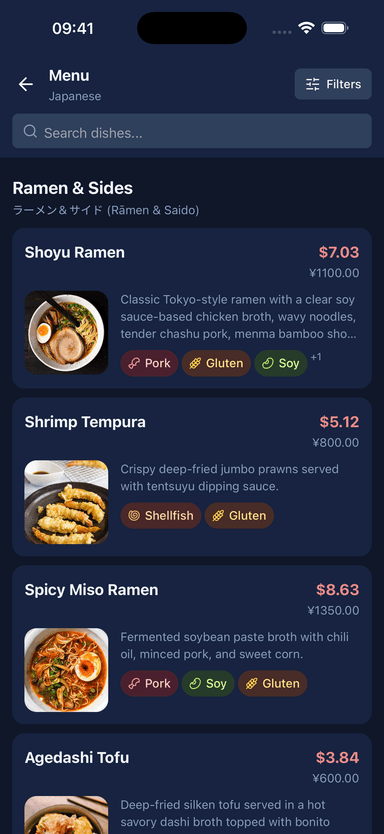
A scanned menu shown as sections and dishes with translated names and descriptions
#2

Google Translate

Free.
Best at

Coverage. Far more languages than anything else here, live translation through the camera, offline packs, and no cost. For signs, tickets, opening hours and conversations it is the default for good reason, and its offline mode has saved more meals than any premium feature in this table.

Where it falls short

It translates the words on the menu, not the dish. “Tête de veau” comes back as “calf's head”: correct, and no help at all in deciding whether you want it. It cannot flag an allergen, because it does not know it is looking at food.

Pick it if

Everyone, as the baseline. Just do not expect it to answer “should I order this?”

#3

Papago

Free.
Best at

Korean above all, with Japanese and Chinese close behind. It handles casual phrasing and the shorthand menus use in Hangul better than the generalists, and it offers image translation plus offline packs for its main pairs.

Where it falls short

Outside East Asia the language list is short. And like every generalist here it has no idea it is reading a menu: no ingredients, no allergens, no explanation of the dish.

Pick it if

You are going to Korea, Japan or Taiwan — carry it alongside a menu-specific app.

#4

Google Lens

Free.
Best at

Pointing at anything and getting an answer. Lens overlays a translation on the live camera image and can search the web for what it is looking at, which occasionally surfaces a picture of the dish.

Where it falls short

It is general visual search, so menus are hit and miss: fine with clean printed type, poor with the stylised and handwritten fonts restaurants prefer. No food context, no allergens, and it needs a connection.

Pick it if

A quick one-off lookup when the app is already open.

#5

Apple Translate

Free, built into iPhone.
Best at

Being already there. No install, no account, offline once a language is downloaded, and camera translation is two taps away. On an iPhone it is the lowest-friction option that exists.

Where it falls short

iOS only, a much shorter language list than Google's, and the same fundamental gap: it returns translated text, not a set of dishes you can compare.

Pick it if

iPhone travellers who want one less app on the home screen.

#6

Waygo

Free for a limited number of translations per day, with a paid unlock.
Best at

Being the original menu translator. Waygo launched in 2013 built specifically for Chinese, Japanese and Korean menus and signs, works entirely offline, and glosses dish names rather than translating them character by character — which is how it earned its reputation.

Where it falls short

It has seen very little development in recent years, covers three source languages, and its offline models are well behind what cloud translation does now. Check it still handles your language pair before relying on it.

Pick it if

Offline use in China, Japan or Korea, as a backup rather than your main tool.

How we picked

Every app was assessed on the same capabilities, checked in the app itself or in its published documentation, and re-verified on the date shown under the table. The ranking is specific to this page: an app that wins “best for menus” can sit fourth in “best for travel”, because those are different jobs. Pricing is described by model rather than by number — subscription prices vary by country and go stale faster than anything else on a page like this.

Disclosure

We make MenuVista. That is a bias, so here it is stated rather than buried: MenuVista is ranked first on the menu-specific criteria this page compares, and Google Translate is named the better general-purpose app, because it is.

FAQ

Questions people ask

What is the best app for translating a restaurant menu?
For a menu specifically, MenuVista: it is built to read a menu as a menu and returns dish explanations, ingredients, allergen flags and photos rather than translated text. For general-purpose translation on the same trip, Google Translate is free and covers more languages.
Can Google Translate translate a menu from a photo?
Yes. Point the camera at the menu for a live overlay, or photograph it and select the text. What comes back is a literal translation of the words: dish names are translated term by term, which is usually accurate and rarely enough to decide what to order.
Is there a menu translator that works offline?
Google Translate and Apple Translate both work offline once you download the language, and Waygo is offline-only for Chinese, Japanese and Korean. All three give you translated text. The apps that explain dishes, MenuVista included, do that work in the cloud and need a connection.
Which app is best for food allergies abroad?
No translation app should be treated as a medical safeguard. MenuVista flags common allergens it detects in a dish's ingredients, which is a useful way to narrow a long menu, but anything serious should be confirmed with the restaurant directly — ideally with a written allergy card in the local language.

Scan the menu, then decide

MenuVista turns a photo of any menu into dishes you can compare, with ingredients, allergen flags and photos for each one.

Download on the App StoreGet it on Google Play

Free to try. No account needed.

A scanned menu shown as sections and dishes with translated names and descriptions