

Guide

How to translate a restaurant menu with your phone

Lay the menu flat, fill the frame with one page, and photograph it in the best light you can find. Then decide which problem you are solving: a general translator such as Google Translate gives you the words in seconds and works offline, while a menu app such as MenuVista gives you the dish — what it actually is, what is in it, and whether it contains anything you avoid. Most bad results come from the photo, not from the app.

Last updated August 23, 2026

The short version

  • One page per photo, flat, well lit, with the camera parallel to the page. Angled or curled menus are the single biggest cause of garbled results.
  • A general translator answers “what do these words mean”. A menu app answers “what is this dish and should I order it”. They are different questions.
  • Download an offline language pack before you travel — the restaurant with no signal is exactly where you will need it.
  • Chalkboards, handwritten specials and stylised fonts break most camera translation. Photograph them straight on and expect to check the result.
  • Once you have chosen, show the dish name in the original language rather than attempting the pronunciation.

Decide which problem you are actually solving

Camera translation converts the text on the page. That is enough for a menu written in a language close to your own, where “grilled sea bass with fennel” means exactly what it says. It is not enough where the name of a dish is a name rather than a description: a correct translation of “tête de veau” is “calf's head”, and a correct translation of 螞蟻上樹 is “ants climbing a tree”, which is minced pork with glass noodles. In both cases the translation is right and you are no better informed. A menu app closes that gap by describing the dish, listing its ingredients and flagging allergens, which is a different job from translating.
Get a photo the app can actually read

Optical character recognition is the weak link in every camera translation, and almost all of the failures people blame on translation quality are really failures to read the page. A few seconds of setup fixes most of them.

  • Flatten the menu and hold the phone parallel to it — perspective distortion confuses OCR more than low light does.
  • One page per photo. Two pages at once halves the resolution on each and mixes up the columns.
  • Move towards the light rather than using the flash, which blows out glossy laminated menus.
  • Turn the menu so the text is upright, especially for vertical Japanese or Chinese text.
  • If the menu is in a dark restaurant, photograph it near the window or door on the way in.

Handwritten boards, chalk and wall menus

The daily specials are usually the best thing on the menu and the hardest thing to read. Handwriting, chalk, cursive and decorative fonts all degrade OCR badly, and a live camera overlay tends to flicker between readings rather than settle on one. Photograph the board straight on rather than at an angle from your table, and get close enough that a single dish fills a good part of the frame. Apps built for menus handle handwriting better than general translators do, because they can use the surrounding menu as context — but no tool is reliable here, so treat the result as a strong hint and confirm anything that matters with the staff.

Read the prices, not just the dishes

Two things catch people out. The first is the currency: a number that looks reassuring in yen or won can be a different order of magnitude than you assumed, so convert before you order rather than after. The second is what is not on the menu — a cover charge per person in Italy, a service charge added in much of Europe, bread and olives that arrive unasked and appear on the bill in Portugal and Spain. None of that is a scam, and all of it is normal, but it is worth knowing before you sit down.

Ordering once you have decided

The last step is the one apps usually forget. You have chosen a dish whose name you cannot pronounce, and pointing at a translated English name on your screen means nothing to the waiter. Show the original name instead: on the printed menu with a finger, or on your phone in the original script. Anything that displays the dish in the local language turns a difficult exchange into a two-second one, and it removes the risk of being served whatever the waiter guessed you meant.

Translating a menu, step by step

  1. 1

    Photograph one page, flat and well lit

    Hold the phone parallel to the page so the text is not skewed, fill the frame with a single page, and move towards the light instead of using the flash.

  2. 2

    Run it through the right tool

    Use a general translator if you only need the words, or a menu app if you want the dish explained with its ingredients and allergens.

  3. 3

    Check the dishes you do not recognise

    Any name that translates into something odd or overly literal is usually a dish name rather than a description. Read the ingredient list before deciding.

  4. 4

    Order using the original name

    Show the dish in the local language — on the menu or on your screen — rather than reading out a translation the waiter has never heard.

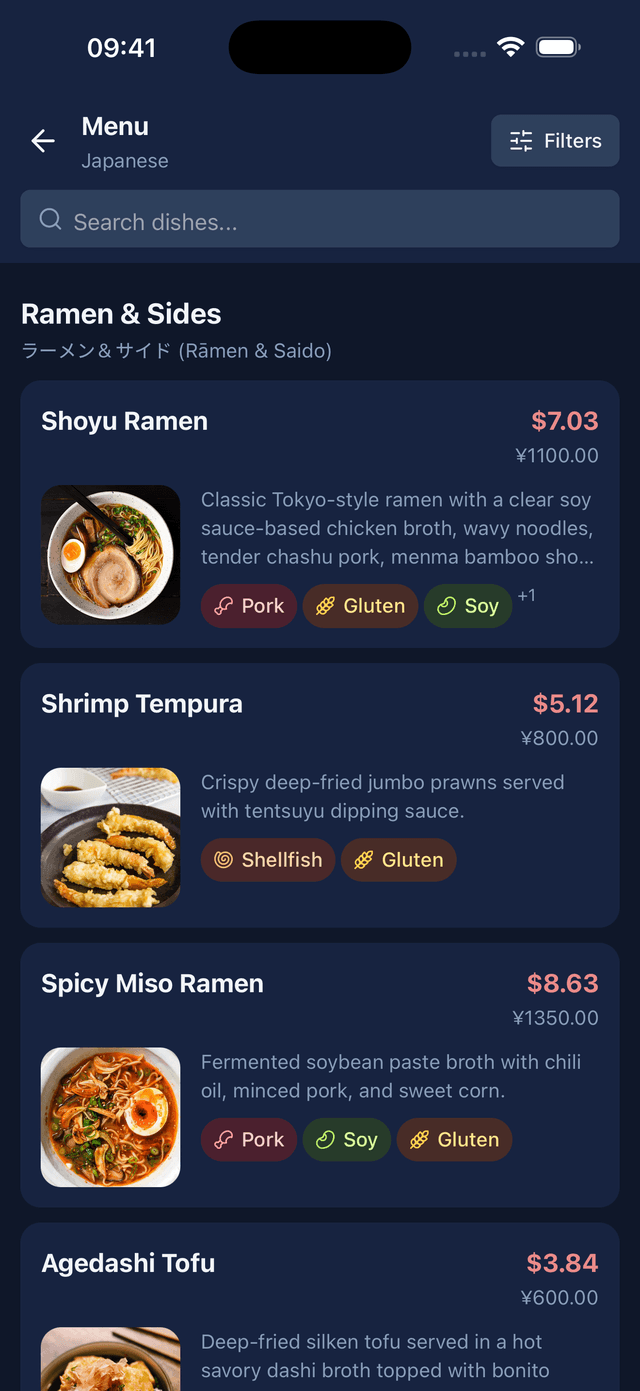
A photographed menu turned into translated sections and dishes
FAQ

Questions people ask

How do I translate a menu from a photo?
Photograph one page flat and in good light, then open it in a translation app. Google Translate will read the text and overlay a translation. A menu-specific app such as MenuVista will instead return the menu as dishes, with a description, ingredients, allergen flags and a photo for each one.
What is the best way to translate a handwritten menu?
Photograph the board straight on and close enough that the writing is large in the frame. Apps built for menus cope with handwriting better than general translators, because they use the rest of the menu as context, but no tool is dependable on chalk and cursive — confirm anything important with the staff.
Can I translate a menu without internet?
Yes, if you download an offline language pack in advance. Google Translate, Apple Translate and Microsoft Translator all support offline translation, and Waygo works offline for Chinese, Japanese and Korean. Apps that explain dishes rather than translate text process the menu in the cloud and need a connection.
Why does my translated menu come out as nonsense?
Almost always the photo. Angled pages, glare from a laminated menu, two pages in one frame or vertical text photographed sideways all break the text recognition step before translation ever happens. Retake the photo flat, upright and one page at a time.

Point your camera at the menu

MenuVista reads the whole menu and hands it back as dishes: what each one is, what is in it, what it contains that you avoid, and what it looks like.

Download on the App StoreGet it on Google Play

Free to try. No account needed.

A photographed menu turned into translated sections and dishes